Golf Simulator Projector Lumens – How many do you need? (2026 Update)
Posted in Projectors
For a room with any light in it, 3,500–4,000 lumens is the floor; a daylight garage wants 5,000 and more. Whatever you buy, the picture mode you play in will be dimmer than the box, because spec-sheet lumens are measured in the brightest, least accurate mode. Plan on less, check the arithmetic for your screen size, and remember the one thing lumens cannot beat: sunlight on the fabric.
In this guide, we’ll break down exactly how many lumens you need, how ambient light and screen size affect brightness, and why modern laser and LED projectors make your simulator look sharper than ever.
In a Nutshell
Most golf simulators need 3,500–4,000 lumens for a room with any light and 5,000 or more for a daylight garage or big screen; 3,000–3,500 is enough only in true blackout. Plan below the box figure, because color-accurate golf modes run well under the rated brightness.
👉 Bottom line: 3,500–4,000 lumens for a lit room, 5,000 and up for a daylight garage, and $40 of blackout before $400 of brightness.
In this guide: In a Nutshell · How this has changed · What a lumen rating measures · The floor, by room · Golf mode dims the number · Screen size and foot-lamberts · Eleven projectors as printed · Does the light source matter? · Blackout and light control · Budget picks · FAQ · Summary
- The floor by room: 3,000–3,500 only in blackout, 3,500–4,000 with any light, 4,000–5,000 and more for garages, big screens and commercial bays.
- The golf-mode cost: color-accurate modes run far dimmer than the rated figure; one owner’s estimate for the BenQ golf line is about 2,450.
- The screen-size check: a 16 × 9 ft screen is nearly five times a 100-inch home-theater screen, so the same lumens land thinner.
- The one thing lumens cannot beat: direct daylight; no projector plays in the sun.
- On a budget: the Optoma GT2400HDR (4,200 lumens on Optoma’s datasheet); for value 4K, the BenQ TK710STi.
Jargon, once:
- ANSI lumens — brightness measured to a standard, in the brightest mode.
- Foot-lambert — brightness reaching your eye from the screen.
- Picture mode — a saved color and brightness setting; golf mode is one.
- Throw ratio — projector distance per foot of image width.
- Ambient light — room light that lands on the screen.
How This Has Changed Since the Original
- Summer 2026:
- Garage owners with the door open called 3,000 lumens barely visible and settled on 5,000 and more.
- A 5,500-lumen ask was called overkill.
- Owners split on whether a cheap Amazon projector can ever be bright enough.
- July 2026: one owner put the BenQ golf line at about 2,450 lumens in its color-accurate modes, the brightness cost of golf mode that the original never mentioned.
- The site’s floor moved from the original’s 3,000–4,000 to 3,500–4,000 for any lit room, with a garage tier above it.
- Optoma’s budget lane is now the GT2400HDR, whose 4,200-lumen figure Optoma’s own page now prints (to ISO 21118).
- Unchanged: the author’s blackout-fabric test and the screen-area rule.
What a Lumen Rating Measures
A lumen rating is measured in the brightest, least accurate picture mode. ANSI lumens follow one standard. Optoma’s GT1080HDR footnote cites ISO 21118 instead, and Epson prints two figures for the LS800, color brightness to IDMS 15.4 and white brightness to ISO 21118. BenQ’s LK936ST marketing page says “Color Accurate Brightness” beside its 5,100, while its spec page labels the same 5,100 ANSI lumens; read it as a bright-mode figure like the rest. Plan with the mode you will play in, always lower than the box.
Lumens and contrast beat resolution for the upgrade you notice (6 reports from 6 owners).
Most owners call 4K’s difference on an impact screen marginal (9 reports from 8 owners).
“lumens are not linear to the human eye. 6000 lumens is NOT twice as bright as a 3000 lumen projector.” (u/phil_trick, 2026-06-30)
The Floor, by Room
Required brightness scales with the light in the room, and owners’ reports sort cleanly by room type.
| Room | Lumens | What owners and reviewers report |
|---|---|---|
| Blacked-out room | 3,000–3,500 | Enough in true blackout; 3,000 survives nowhere else (7 reports from 5 owners and reviewers) |
| Lit basement, lights on to play | 3,500–4,000 | The site’s working floor; the AH700ST’s 4,000 called plenty (6 reports from 6 reviewers) |
| Garage with daylight, windows, or a big screen | 4,000–5,000 and up | Rated brightness must sit well above home-theater norms (5 reports from 4 owners) |
| Garage lights on, 4,000-lumen AK700ST | Holds up | Avoids the washed-out look of dimmer units (7 reports from 7 owners and reviewers) |
| 5,100-lumen LK936ST in daylight | Washes out | Needs blackout shades to look its best (5 reports from 3 owners) |
| Bright multi-use room, door open | A TV instead | TVs stay watchable where cheap projectors wash out (5 reports from 5 owners) |
| Direct sunlight | None | No projector plays in the sun |
One owner with the garage door open this summer, and two more on daylight and darkness generally:
“3000 right now is barely visible” (u/thisaintcharity324, 2026-06-28)
“I’ve determined 5000 will be enough to combat light” (u/thisaintcharity324, 2026-06-28)
“You can’t take any projector outside to watch. It doesn’t work.” (u/BirdieBoxGolf, 2026-08-02)
“Mine is good in my windowless garage.” (u/ctriopelle, 2026-09-07)
Golf Mode Dims the Number You Planned On
Spec lumens are bright-mode lumens; the color-accurate presets owners use, golf mode or living-room mode, run dimmer. One owner, across two threads, put the figure at about 2,450 lumens for the AH700ST and AK700ST in golf mode. It is one owner’s number, not a spec, but the honest planning figure: plan on well under the box and check foot-lamberts for your throw distance.
TK710STi owners call the picture sharp and playable with some room light (7 reports from 5 owners).
“TK710sti is plenty bright for my setup. If you are using it in living room mode (for more accurate colors) I think it is around 2450 lumens.” (u/kolky75, 2026-07-15)
What each preset changes, model by model: Golf Mode – Do You Need It In Your Simulator Projector?
Screen Size and the Foot-Lambert Check
The author’s rule of thumb holds: double the screen area and you need close to double the lumens on the fabric. One owner ran the arithmetic this summer; it is one owner’s math, not a measurement.
“A true 16×9 ft screen is 144 sq ft, nearly 5x the area of a 100″ home theater screen (30 sq ft). So 3000 lumens puts about 21 foot-lamberts on that surface… 5000 lumens gets you to about 35 fL, and that’s a difference you actually see in daylight.” (u/Plenty-Garage-3585, 2026-07-01)
The fabric is the other half. Gray screens earn their premium mostly under about 4,000 lumens or with the lights on, where owners and reviewers say gray gives a usable picture white did not (7 reports from 5 owners and reviewers).
A comparable group calls the gray-versus-white difference subtle, mattering less in a fully dark room (8 reports from 7 owners). Best Impact Screen Materials for Picture Quality
Eleven Projectors, Brightness as Printed
Brightness as each maker prints it, and whether the page names a standard; figures checked on 2026-09-07, prices and the GT2400HDR row on 21 October 2026.
| Model | Lumens as printed | ANSI labeled? | Light source | Rated hours | Throw ratio | Price |
|---|---|---|---|---|---|---|
| BenQ TK700STi | 3,000 | Yes | Lamp | 4,000–15,000 by mode | 0.9–1.08 | About $200 above the GT2400HDR per one shopper (August); now end of life at BenQ |
| BenQ TK710STi | 3,200 | Yes | Laser and LED | 20,000 (spec page)¹ | 0.69–0.83 | $2,199 at Carl’s Place and Shop Indoor Golf; $1,999 at BenQ |
| BenQ AH700ST | 4,000 | Yes | Laser | 20,000 | 0.69–0.83 | $2,299 at BenQ and Carl’s Place |
| BenQ AK700ST | 4,000 | Yes | Laser | 20,000 | 0.69–0.83 | $2,899 at BenQ and Carl’s Place ($2,000–2,899 reported) |
| BenQ LK936ST | 5,100 | Yes on the spec page; the marketing page says “Color Accurate Brightness” | Laser | 20,000 (page) | 0.81–0.89 | $4,899 at BenQ and Carl’s Place |
| Epson LS800 | 4,000 color, 4,000 white | Color to IDMS 15.4, white to ISO 21118 | Laser | 20,000 (page, Normal Mode) | 0.16–0.40 | Discontinued new at Epson; $1,999.99 Certified ReNew (new list was $3,799.99) |
| Epson PowerLite L790SE | 7,000 | Color to IDMS 15.4, white to ISO 21118 | Laser | 20,000 normal, 30,000 extended | 0.79–1.36 | $6,349.00 at Epson, out of stock |
| Optoma GT1080HDR | 3,800 | ISO 21118, not ANSI | Lamp, 240 W | 4,000–15,000 by mode | 0.49 | Not published; check the current price |
| Optoma GT2000HDR | 3,500 | Not labeled | Laser | 30,000 | 0.496 | $1,199 on sale at Shop Indoor Golf (list $1,499); about $700–1,200 reported |
| Optoma GT2100HDR | 4,200 | Not labeled | Laser | 30,000 | 0.496 | $1,499 at Shop Indoor Golf |
| Optoma GT2400HDR | 4,200 | ISO 21118, not ANSI | Laser | 30,000 | 0.496 | $1,299 at Shop Indoor Golf |
¹ 20,000 hours on BenQ’s current spec page.
The GT2000HDR and GT2100HDR are current models on Optoma’s pages; the site’s 4K guide no longer recommends them because no owner mentioned either in 90 days.
Brightness and resolution for floor mounts: Floor Mounted Golf Simulator Projectors – Tips, Tricks & Buying Guide · Contrast as printed for the same ten: What is a good Contrast ratio for a Golf Simulator Projector?
Does the Light Source Matter?
For the lumen number, no; for how long you keep it, yes. A lamp dims and needs replacing: the TK700STi and GT1080HDR are rated 4,000 to 15,000 hours by mode, bright mode at the short end. BenQ’s AH700ST and AK700ST lasers are rated 20,000 hours and the LK936ST’s page says the same, Optoma’s 30,000, the L790SE 30,000 in extended mode, and the TK710STi’s laser-and-LED engine 20,000 on its spec page. Nine of the eleven models are laser; owners treat the lamp swap as the reason to pay for it.

“being laser you never deal with lamp swaps… nothing at this price beats direct daytime sun. after sunset youre good.” (u/jbr_north, 2026-08-02) [sic]
Blackout Fabric and Light Control
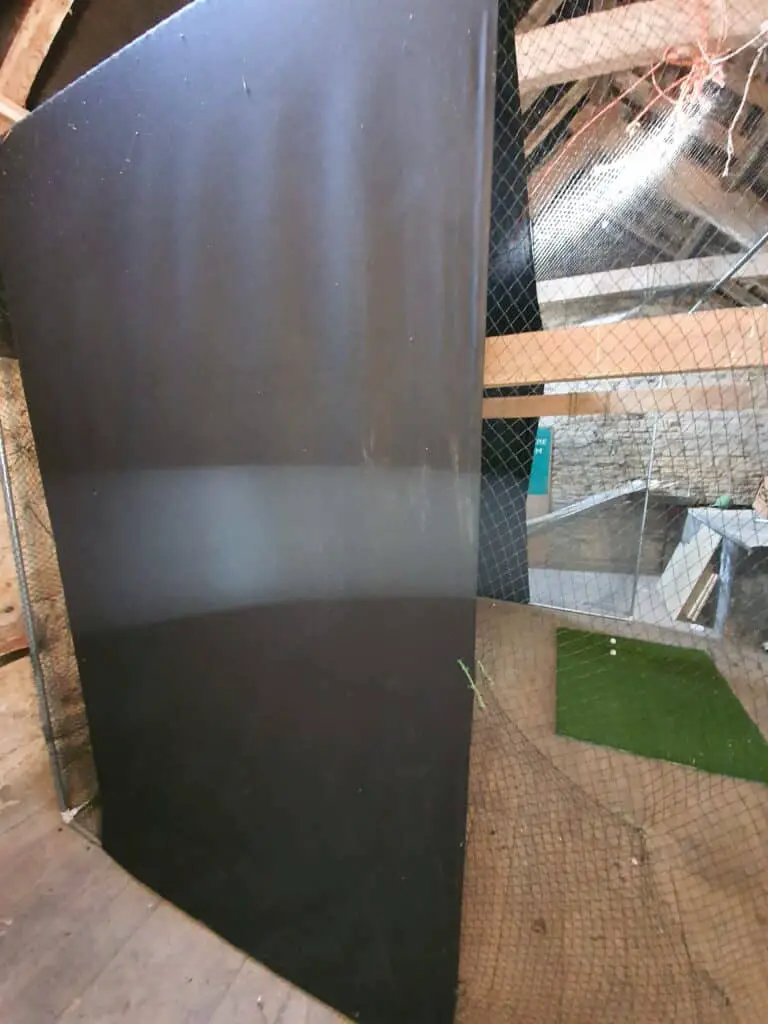
Ambient light still dominates: a 3,000-lumen unit in a dark basement beats 5,000 lumens against a sunlit garage door, which is why the site’s projector guide says “$40 of blackout beats $400 of brightness.” The author proved it years ago.
In my very first setup, years ago, I bought a roll of black fabric measuring 1.5m x 10m for around £35 and draped it around my enclosure, pulled it taught and tied it in place. This improved my screen brightness dramatically.
- Keep light off the screen: zoned lighting, baffles, dark walls near the fabric (8 reports from 7 owners).
- One spotlight over the hitting zone is enough to play by without touching the screen (6 reports from 6 owners).
The full lighting plan: Lighting in a Golf Simulator – Optimize Accuracy, Practice and Aesthetics
Budget Picks and the Five-Thousand-Lumen Folk Wisdom
When one shopper’s dad arrived this August insisting on at least 5,000 lumens because a friend said so, the community’s answer was the right one: it depends entirely on the room. Owners are split on cheap projectors and on how much is too much.
| Lane | Pick | Lumens as printed | Price (21 October 2026) | Owner and reviewer evidence |
|---|---|---|---|---|
| Budget laser | Optoma GT2400HDR | 4,200 | $1,299 at Shop Indoor Golf | Its predecessor, the GT2000HDR, was the budget-laser value pick (7 reports from 7 owners) |
| Value 4K | BenQ TK710STi | 3,200 | $2,199 at Carl’s Place and Shop Indoor Golf; $1,999 at BenQ | Prices vary widely by region and retailer (6 reports from 6 owners and reviewers) |
| Golf line | BenQ AK700ST | 4,000 | $2,899 at BenQ and Carl’s Place ($2,000–2,899 reported) | The most-reported price band (8 reports from 8 reviewers) |
| Bright or commercial room | BenQ LK936ST | 5,100 | $4,899 at BenQ and Carl’s Place | Weighed against the AK700ST for lumens and lens shift (8 reports from 8 owners and reviewers); picture praised (6 reports from 6 owners and reviewers) |
“Do yourself a favor and do not buy a cheap Amazon projector, you need lumens and they do not have it. Stick to Benq, Optoma and Epson if you can.” (u/th3fxr, 2026-08-26)
“Is it super bright in the room? 5500 lumens might be overkill.” (u/SituationFragrant245, 2026-09-01)
“I purchased a used Optoma 1090 HDR off a member on reddit. It was slightly used but well under 1000.00. I have been really impressed with it.” (u/flyin-lowe, 2026-08-20)
“That price isn’t going to be enough for a laser with high lumens. I just went through this myself. The only way this happens is if you don’t get a short throw.” (u/highangler, 2026-07-23)
The used market and the older Optoma models are where the folk wisdom breaks down: a well-lit picture is a room and a screen, not a lumen count.
Projector Lumens FAQ
How many lumens does a golf simulator need?
3,500–4,000 with any light, 4,000–5,000 and more for a daylight garage or big screen, and 3,000–3,500 only in blackout.
Is 3,000 lumens enough for a golf simulator?
Only in a blacked-out room; garage owners with the door open called it barely visible.
Are ANSI lumens different from lumens?
ANSI lumens follow a standard; some pages cite ISO 21118 or IDMS 15.4, and some name none.
Why does golf mode look dimmer than the rating?
The rating is measured in the brightest mode; color-accurate presets run far dimmer, about 2,450 by one owner’s estimate.
Does screen size change how many lumens are needed?
Yes. Doubling the screen area requires close to double the lumens on the fabric.
Can a projector work with the garage door open?
No projector beats direct sunlight; blackout or another room beats any lumen count.
Do lasers stay bright longer than lamps?
Yes. Lasers are rated 20,000–30,000 hours and fade slowly; lamps 4,000–15,000 by mode, dimming toward a swap.
Summary
Size brightness to the room, not the box: 3,500–4,000 lumens for a lit room, more for a garage, and a picture mode dimmer than the rating. Before buying, list your must-haves:
- Throw ratio for your mount.
- Lumens for your room.
- The picture mode you will play in.
- Screen size.
- The light source you can live with.
Related guides: Best Golf Simulator Projector 2026 – 6 Step Buying Guide + Setup Examples · Golf Mode – Do You Need It In Your Simulator Projector? · What is a good Contrast ratio for a Golf Simulator Projector? · What is the perfect golf simulator projector throw ratio? · Lighting in a Golf Simulator – Optimize Accuracy, Practice and Aesthetics · Best Impact Screen Materials for Picture Quality · 4K Golf Simulator Projectors – Complete 2026 Guide
Check current prices: BenQ TK710STi · BenQ AK700ST · Optoma GT2400HDR
Bushnell Launch Pro vs SkyTrak ST MAX (2026)
Golf Simulator Packages vs Building Your Own: Which Is Better Value?
ABOUT THE AUTHOR
Hello! My name is Alex and it is my mission to bring you all the information you need to build your own home golf simulator! I hope mygolfsimulator.com helps you on your journey to better golf at home!
LEGAL INFORMATION
On this site, you'll find articles on all aspects of building a golf simulator. I will also link to other sites where you can buy some of the simulator components. Some of these links may be affiliate links, which means if you click them I gain a small commission at no extra cost to you. This really helps out me and my site so thank you in advance! mygolfsimulator.com and all related social media accounts are property of Awonline LTD.