HackMotion in a Golf Simulator: All the Data you need!
Posted in Launch Monitor Data, Launch Monitors
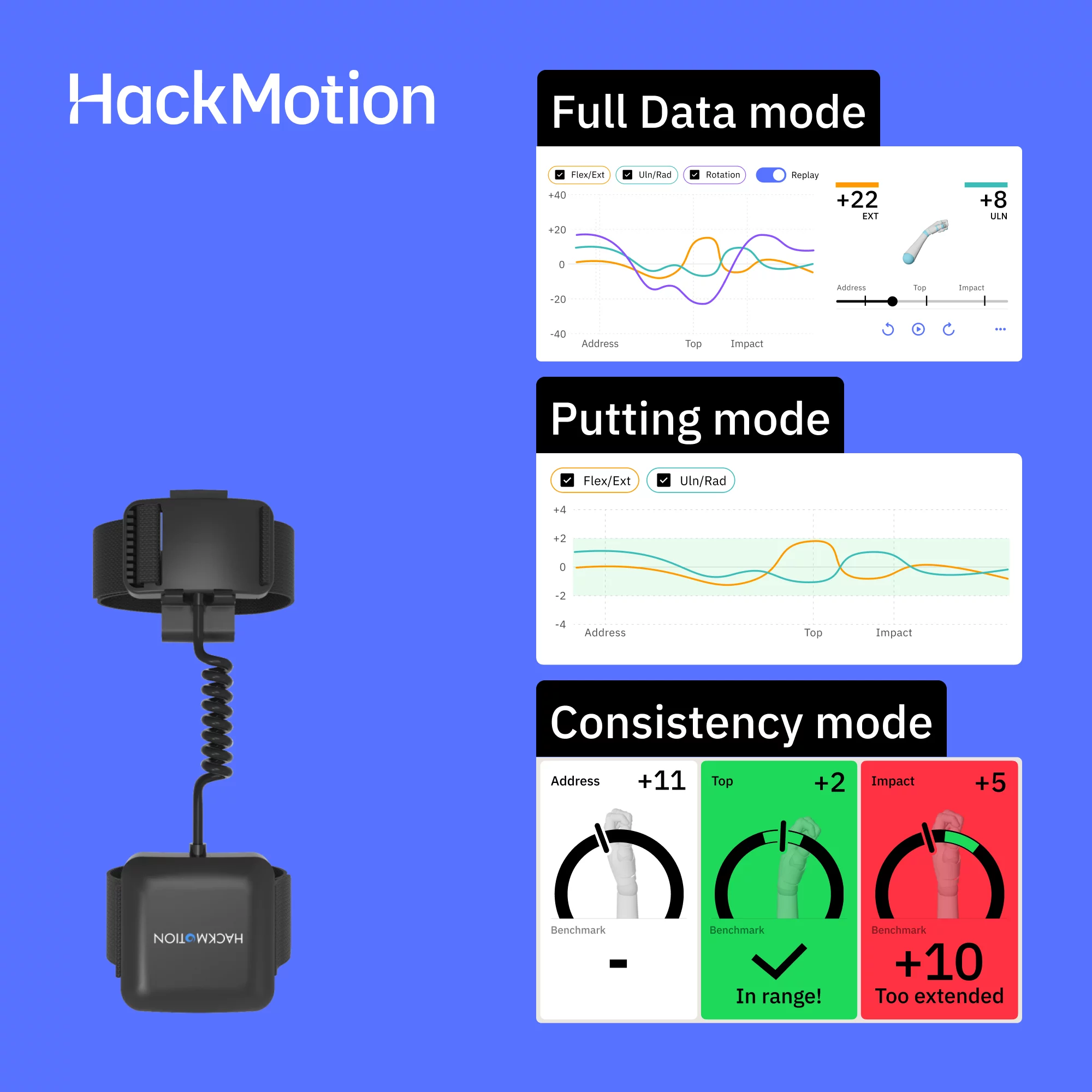
HackMotion reads the lead wrist’s flexion, deviation and rotation through the swing, the launch monitor reads the ball and the club, and nothing links the two. In a bay you run two apps and read cause against outcome. That is HackMotion’s own framing, and it publishes no data sync with any launch monitor or simulator program. Owners confirm it on lead-wrist flexion at impact and casting, split on whether it was worth the money, and report that the value fades once the fault is fixed.
In a Nutshell
HackMotion reads the lead wrist’s flexion and extension, radial and ulnar deviation and rotation, the launch monitor reads the ball and club, and nothing links the two: in a bay you run the two apps side by side and read cause against outcome.
👉 Bottom line: add it for one fault, run it beside the launch monitor until the fault is gone, and expect the value to fade once it is.
In this guide: In a Nutshell · How this has changed · What each device reads · Two apps, no sync · Tiers and the money · Does it improve the swing · Putting, coaching and sharing · FAQ · Summary
- What it reads: the lead wrist’s flexion and extension, radial and ulnar deviation, and rotation.
- What the launch monitor reads: path, face, spin, loft and low point, the outcome.
- No sync: no integration with any launch monitor or simulator software; two apps side by side.
- The tiers: Core for the full swing, Plus adds putting, Pro adds tour comparisons and profiles.
- The split: worth five lessons to one owner, not worth buying again to another.
Jargon, once:
- Flexion and extension — bowing or cupping the wrist.
- Radial and ulnar deviation — hinging the wrist toward the thumb or the little finger.
- Rotation — turning the forearm, which opens or closes the face.
- Lead wrist — the left wrist for a right-hander.
- 6-axis sensor — a motion sensor reading movement and rotation on three axes each.

How This Has Changed Since 2024
- August 2026: a used sensor bought on eBay arrived locked to its seller’s account.
- August 2026: the Sensor 4 adds a haptic cue and fits under a glove; one owner had returned the old version over its fit.
- August 2026: the pattern that the value fades once the fault is fixed, and the split on whether it was worth the price.
- August 2026: owners feed session data into outside tools between lessons.
- Corrected: HackMotion now describes the hardware as “2 Advanced 6-axis motion sensors”, not gyroscopes, magnetometers and accelerometers.
- Unchanged: no integration with any launch monitor or simulator software.
What HackMotion Reads, and What the Launch Monitor Reads
HackMotion’s own page draws the line: “HackMotion = cause (lead wrist angles, flexion, extension, rotation).” and “Launch monitor = outcome (path, face, spin, loft, low point).” The sensor samples the lead wrist at 800 frames a second and marks address, the top and impact on its own. Feedback comes by sound, a haptic pulse on the Sensor 4, and the app’s picture of the swing. The goal it sets for the full swing is “more flexion (flatter wrist) at impact than at address.” Owners confirm the two faults it is best at, and neither is a launch-monitor number:
“If lead wrist flexion at impact is something you’re working on then it’ll help get you there” (u/HamburgerSink, 2026-07-27)
“After 2 years of trying to fix my driver it helped me finally click into what was causing my issues. Casting and wrist flexion.” (u/Substantial-Okra-640, 2026-07-27)
The three wrist angles are the maker’s list; no 2026 owner names radial deviation or rotation by name. The sensor itself is light enough to forget (6 reports from 6 reviewers).

| Number | Read by | Where in the swing |
|---|---|---|
| Flexion and extension | HackMotion | Address, the top and impact (WC-7) |
| Radial and ulnar deviation | HackMotion | Through the swing (the putting guide’s WC-6) |
| Rotation | HackMotion | Through the swing; opens or closes the face (WC-10) |
| Path, face, spin, loft, low point | The launch monitor | Impact and flight (WC-9) |

Running It in the Bay: Two Apps, No Sync
There is no integration: HackMotion’s site names no simulator program, no GSPro, E6, Awesome Golf or Uneekor, and claims no data link to any launch monitor; the app runs beside the simulator. It names simulators as a venue, “designed to be used for practice in driving ranges, simulators or home setups”, rules out on-course use, and needs a ball. One owner runs it beside a launch monitor for club and impact detail, as the packages guide quotes.
Four steps: calibrate, pick one fault — slice, push, hook, pull, over the top, thin or fat, distance — from the maker’s list, hit the session. Compare the wrist numbers with the club numbers; patterns over sessions beat one reading. The app is free on iOS and Android.
Launch Monitor Data – 33 Parameters Explained
What is Smash Factor? – Launch Monitor Data 101
Golf Simulator Cameras Made Simple – Maximise your Improvement!
Tiers, the Sensor 4 and the Money
The Sensor 4 adds a faster processor, Bluetooth 6.0, a haptic motor and an under-glove fit over the Sensor 3’s buzzer and clip. A trade-in is $195 flat, tier carried over. Upgrades are software only. No subscription. Two-year warranty. 30-day returns with shipping paid. Buyers get the tier wrong most often (7 reports from 6 owners); one 2026 owner named only Core and Pro, but Plus is on the maker’s site.
Hackmotion Packages – Core, Plus, and Pro Compared
| Tier | Full swing | Putting | Tour library and profiles | Sensor 4 | Sensor 3 |
|---|---|---|---|---|---|
| Core | Yes | No | No | $345 | $275 |
| Plus | Yes | Virtual coach, analysis, drills | No | $490 | $420 |
| Pro | Yes | Yes | The PGA Tour swing library; multiple profiles | $985 | $915 |
Sensor 4 prices are HackMotion’s own list prices, $70 over the Sensor 3 packages, as its store showed them on 21 October 2026 (WC-1).
Does It Improve the Swing? The Split
Owners report lower scores and better distance control more than anything else (17 reports from 12 owners and reviewers).
Long-term owners and reviewers recommend it strongly (8 reports from 8 owners and reviewers), and the 2026 split is about value rather than function. One owner found it worth five lessons, as the packages guide quotes, and another did not:
“Overall I’d say not great value for me, wouldn’t buy it again.” (u/dflek, 2026-07-27)
One owner adds that it may matter less to a golfer already breaking 90.
It reads only the wrist (4 reports from 4 owners and reviewers), and some owners chase the app’s green checkmarks instead of the fault.
Reliability complaints run beside the praise (5 reports from 5 owners), and one owner asked whether a drill’s detection was glitchy or their own error.
Teaching pros get value from it in lessons (6 reports from 6 owners and reviewers), and it works best beside coaching rather than instead of it.
The closing frame is the fade pattern: great at once, less useful once the fault is gone, and owners who stopped using it played worse:
“But it does lose its effectiveness once you iron out those issues with your swing.” (u/TFinley90, 2026-07-27)
Putting, Coaching and Sharing
Plus and Pro carry the putting virtual coach, analysis and drills, covered in the putting guide. Between lessons, owners feed session data into outside tools; one calls the sensor a secret weapon. Sharing is the limit: “Each sensor has a single license, which can be activated for a single HackMotion account.”

“My understanding is that the device is tied to one account so it’s not going to work for any long term data collection.” (u/Substantial_Team6751, 2026-08-22)
Pro’s profiles are for a coach with several players; the PGA Tour swing comparisons are Pro-only, while every tier’s coaching draws on a dataset that includes tour players.

Putting with Hackmotion – Step by Step Guide
HackMotion in a golf simulator FAQ
Does HackMotion connect to a launch monitor or GSPro?
No. HackMotion publishes no data link with any launch monitor or simulator program; it is a second app.
What does HackMotion measure that a launch monitor does not?
The lead wrist’s flexion and extension, radial and ulnar deviation, and rotation; the launch monitor reads the outcome.

Which HackMotion tier is needed in a simulator?
Core covers the full swing, Plus adds putting, Pro adds tour comparisons and profiles; the bay changes nothing.
Does HackMotion work under a golf glove?
The Sensor 4 fits under a glove; the Sensor 3 clips to it.
Does a shared HackMotion sensor work for two golfers in the same bay?
Each sensor carries one license tied to one account, so a second golfer plays on the owner’s account; Pro’s profiles are for coaches.
Summary
HackMotion reads the lead wrist and the launch monitor reads the ball and club; nothing links them, so run two apps and read cause against outcome. Buy the tier for the fault, and expect the value to fade once the fault is gone.
Related guides: Hackmotion Packages – Core, Plus, and Pro Compared · Putting with Hackmotion – Step by Step Guide · Launch Monitor Data – 33 Parameters Explained · What is Smash Factor? – Launch Monitor Data 101 · Golf Simulator Cameras Made Simple – Maximise your Improvement! · How to Practice in a Golf Simulator – 40 Easy Ways

Carl’s Place Pro Golf Enclosure Review (2026): What’s in the Box, Real Cost and Owner Reports
Is SkyTrak Portable? Battery, Direct Mode and Range Days (2026)
ABOUT THE AUTHOR
Hello! My name is Alex and it is my mission to bring you all the information you need to build your own home golf simulator! I hope mygolfsimulator.com helps you on your journey to better golf at home!
LEGAL INFORMATION
On this site, you'll find articles on all aspects of building a golf simulator. I will also link to other sites where you can buy some of the simulator components. Some of these links may be affiliate links, which means if you click them I gain a small commission at no extra cost to you. This really helps out me and my site so thank you in advance! mygolfsimulator.com and all related social media accounts are property of Awonline LTD.